一、组网需求
在交换机上创建一个虚拟防火墙保护指定的区域。对于服务器区,需要将防火墙卡部署在服务器区出口。
二、组网拓扑
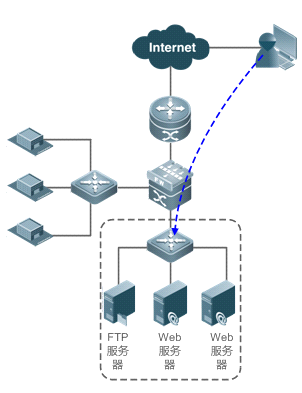
三、配置要点
步骤一,首先进行基础安全功能配置,包括协议类攻击防御、全局防护和防攻击域;
步骤二,按照涉及功能进行功能点优化类配置;
步骤三,按照场景进行场景类优化配置;
完成实施部署后,可以观察一段时间业务是否运行正常,如果业务存在误阻断或者存在默认值无法阻隔攻击行为,可以在进行参数的调整。
四、配置步骤
基础安全功能配置
协议类攻击防范
服务器区的安全性是最重要的,建议开启所有的协议类攻击防御。内网场景则由用户根据需求启用相应的防御。
Firewall(config)#
firewall-config vfw1------>进入虚拟墙vfw1配置模式
Firewall(config-vfw)#
defend winnuke------>防winnuke攻击
Firewall(config-vfw)#
defend source-route------>防带源路由选项IP报文攻击
Firewall(config-vfw)#
defend route-record------>防带路由记录选项IP报文攻击
Firewall(config-vfw)#
defend icmp-unreachable------>防ICMP不可达攻击
Firewall(config-vfw)#
defend icmp-redirect------>防ICMP重定向攻击(开启前需确认下现网中是否有web认证等使用icmp重定向功能业务)
Firewall(config-vfw)#
defend fraggle------>防fraggle攻击
Firewall(config-vfw)#
defend land------>防land攻击(默认是开启的,show不出来,no掉才有show配置)
因为是协议类攻击被防火墙模块丢弃的报文,防火墙模块都会进行统计,可以在web界面或cli界面上使用show
defend vfw-name drop,查看统计信息。
配置全局防护
为保护防火墙自身资源,避免攻击发生时防火墙自身资源耗尽引起全网故障,需要配置全局防护。
Firewall(config)# firewall-config
vfw1------>进入虚拟墙vfw1配置模式
Firewall(config-vfw)# defend-zone
global ----->配置全局防攻击域
Firewall(config-defend-global)#
tcp syns-in global threshold 50000 action anti-spoofing------>防火墙的syn报文总速率检查
Firewall(config-defend-global)#
tcp half-conn-in global threshold 100000 action anti-spoofing------>防火墙的TCP半连接总数检查
Firewall(config-defend-global)#
session-limit unauth-src-new-session 50000------> 限制所有未验证源的会话新建速率
Firewall(config-defend-global)#
session-limit tcp 60000------> 限制TCP会话新建速率
Firewall(config-defend-global)#
session-limit udp 20000------> 限制UDP会话新建速率
Firewall(config-defend-global)#
session-limit icmp 10000------> 限制ICMP会话新建速率
Firewall(config-defend-global)#
session-limit other-protocol 10000------> 限制除TCP/UDP/ICMP外的其它协议会话新建速率
注意:此处阈值设置是对应的用户规模为1万用户,实际部署时要按照用户规模同比调整。然后再根据用户网络的实际流量情况进行调整,调整方法参见优化配置章节。
配置防攻击域
配置防攻击域可以实现以下目标:
1)针对某个区域的主机进行独立防护
2)动态策略自学习功能
3)抵御各种攻击类型
4)精细化的流量监视
5)手工指定直通流量与黑名单
6)设定主机限速
7)完整的攻击报告
创建网络防攻击域
以保护192.168.1.0/24范围的服务器区为例:
Firewall(config)#ip access-list
standard servers ------>对所需要保护的服务器或某特定区域的IP,需要访问他们的数据流经过FW的时候进行安全检测。
Firewall(config-std-nacl)# permit
192.168.1.0 0.0.0.255
Firewall(config-std-nacl)# exit
Firewall(config)# firewall-config
vfw1------>进入虚拟墙vfw1配置模式
Firewall(config-vfw)# defend-zone
web
Firewall(config-defend-zone)#
description “Web server zone”
Firewall(config-defend-zone)# ip
access-group servers
开启策略自学习和流量监控
通过策略自学习和流量监控,可以根据实际流量情况来生成和调整配置 :
Firewall(config-defend-zone)#
traffic-monitor all
Firewall(config-defend-zone)#
exit
Firewall(config-vfw)# exit
Firewall(config)# exit
Firewall# net-defend learning
vfw1 web------>开启虚拟墙vfw1下网络防攻击域的自学习,默认学习7天
策略学习的时间建议不低于7天,且学习期间不能出现严重的攻击流量,否则学习结果将出现偏差。
策略学习完毕后,可以通过show
net-defend learning vfw-name defend-zone命令查看学习生成的推荐配置,同时也可以通过show
defend-zone vfw-name
defend-zone traffic-snapshot命令查看流量监控结果。
配置动态防御策略
综合策略学习与流量监视的结果,配置最终的策略(一般可以将水线上浮50%~100%)。
Firewall(config-defend-zone)
tcp-unauth half-conn-in dst-ip threshold
200 action anti-spoofing ------>tcp flood防护 #未认证源针对域内某一目的IP的TCP半连接
Firewall(config-defend-zone)
tcp-unauth half-conn-in global threshold
10000 action anti-spoofing ------>tcp flood防护 #未认证源针对域内所有目的IP的TCP半连接
Firewall(config-defend-zone)
tcp-unauth syns-in dst-ip threshold
100 action anti-spoofing ------>tcp flood防护 #未认证源针对域内某一目的IP的TCP
syn攻击
Firewall(config-defend-zone)
tcp-unauth syns-in global threshold
2000 action anti-spoofing------>tcp flood防护 #未认证源针对域内所有目的IP的TCP
syn攻击
Firewall(config-defend-zone) tcp-auth conn-in src-ip threshold 1000 action
limit ------>tcp flood防护 #某一认证源对域内TCP已连接攻击
Firewall(config-defend-zone) tcp-auth half-conn-in src-ip threshold 50 action
limit ------>tcp flood防护 #某一认证源对域内TCP半连接攻击
Firewall(config-defend-zone) tcp-auth syns-in src-ip threshold 50 action limit ------>tcp flood防护 #某一认证源对域内TCP SYN攻击
Firewall(config-defend-zone) udp unauth-src-in global threshold 2000 limit ------>udp flood防护 #针对防攻击域外未认证源IP到防攻击域内所有目的IP UDP攻击
Firewall(config-defend-zone) udp auth-src-in src-ip threshold 1000 limit ------>udp flood防护 #针对防攻击域外某一个认证源IP对防攻击域内的UDP攻击
Firewall(config-defend-zone) udp pkt-in global threshold 60000 action limit------>udp flood防护 #针对防攻击域外到防攻击域内所有目的IP UDP攻击
Firewall(config-defend-zone) udp pkt-in dst-ip threshold 3000 action limit ------>udp flood防护 #针对防攻击域外到防攻击域内某一个目的IP UDP攻击
Firewall(config-defend-zone) icmp unauth-src-in global threshold 1000 timeout
600 limit ------>icmp flood防护 #针对防攻击域外未认证源IP到防攻击域内所有目的IP
ICMP攻击
Firewall(config-defend-zone) icmp auth-src-in src-ip threshold 100 timeout 600
limit ------>icmp flood防护 #针对防攻击域外某一个认证源IP对防攻击域内的ICMP攻击
Firewall(config-defend-zone) other-protocol unauth-src-in global threshold 1000
timeout 600 limit ------>其它协议flood防护
Firewall(config-defend-zone) other-protocol auth-src-in src-ip threshold 1000
timeout 600 limit------>其它协议flood防护
Firewall(config-defend-zone) scan in src-ip threshold medium action blocking------>防扫描,防攻击域外对域内发起的扫描攻击
Firewall(config-defend-zone) log
all------>配置记录攻击日志
注意:策略学习生成的结果中不包含扫描相关策略,需要用户手动添加配置。服务器区场景,主要防御从外向内的攻击,配置入方向扫描攻击防御;
在内网场景下,需要防御内网向外的扫描攻击,需要增加配置出方向的扫描攻击防御。
配置静态防御策略
根据用户的需求,设置黑名单、直通流量(白名单),以及限速策略。
Firewall(config-defend-zone)
blacklist 220.159.1.100
Firewall(config-defend-zone)
bypass 192.168.1.100
Firewall(config-defend-zone)
ratelimit in src-ip bandwidth 800000
Firewall(config-defend-zone)
session-limit in src-ip session-rate 100
注意:服务器区主要配置入方向的带宽限速、新建会话速率限速策略。而内网场景可以增加出方向的限速策略,用于防御从内向外的攻击(部分服务器中毒的情况,也会出现从内向外的攻击流量),保护出口的带宽资源与会话资源。
优化配置
优化调整flood攻击阈值
完成配置后,需要观察策略是否合适。可以通过以下命令观察防攻击模块的运行状态。
show defend-zone vfw-name { global | net-defend-zone-name } counters ----->查看全局防护或防攻击域的报文计数
show defend-zone vfw-name
net-defend-zone-name running-protect --------->查看攻击域当前正在发生的攻击和防护,命令的后面可以加上策略类型或攻击类型,对结果进行过滤 defend-zone vfw-name
net-defend-zone-name report ------->查看攻击域之前的攻击和防护的记录,即攻击日志。命令的后面可以加上起止时间、策略类型或攻击类型,对结果进行过滤
注意:当配置的策略不恰当,导致报文被防攻击丢弃时,可以通过以上命令找到引起问题的策略。调整策略后再继续观察,最终得到高峰期不丢包的策略水线,将该水线值上浮50%~100%即可。
日常维护中也可以使用以上命令,观察和回溯网络中的攻击,评估网络状况。
超长连接的优化
在银行、运营商等用户场景的应用中,经常会出现没有通讯的超长连接需要保持(通常是数据库应用)。防火墙模块,默认对tcp连接,在没有报文通讯的情况下,是保持1800秒,随后老化,防火墙模块可以通过配置允许ack建流的方式,解决特定场景下的不通讯的超长连接。配置命令为ip session device-id slot-id tcp-loose
Firewall(config)# ip session 1 3 tcp-loose
特殊场景配置
如果两张防火墙卡独立部署的场景中,用户数据流存在来去路径不一致的问题,则默认防火墙安全功能会导致拒绝流表的建立。在来去路径无法调整一致的情况下才可进行规避使用。由于关闭该功能防火墙安全功能将极大削弱,例如TCP防伪功能无法生效,所以在默认的场景不建议关闭TCP状态监测。
关闭TCP状态监测功能: ip session device-id slot-id
tcp-state-inspection-disable
Ruijie(config)#ip session 1 3
tcp-state-inspection-disable
四、功能验证
查看当前防攻击业务模块的接入情况,假设防火墙插在交换机的3槽:
Ruijie#
show defend module
Defend services module:
1
Group Slot CPU State
----------------------------------------
0
3
0
Online ------>Online表示完成连接并且已经完成业务配置
通过show run查看配置,确认配置完整:
Ruijie#
show run
......
firewall-config
vfw1
......
defend-zone web
scan in src-ip threshold medium action
blocking
other-protocol unauth-src-in global
threshold 1000 timeout 600 limit
other-protocol auth-src-in src-ip
threshold 1000 timeout 600 limit
udp pkt-in dst-ip threshold 3000 action
limit
udp pkt-in global threshold 60000 action
limit
udp auth-src-in src-ip threshold 1000 limit
traffic-monitor all
tcp-unauth half-conn-in dst-ip
threshold 200 action anti-spoofing
tcp-unauth half-conn-in global
threshold 10000 action anti-spoofing
tcp-unauth syns-in dst-ip threshold 100 action anti-spoofing
tcp-unauth syns-in global threshold 2000 action anti-spoofing
tcp-auth half-conn-in src-ip threshold
50 action limit
tcp-auth conn-in src-ip threshold 1000
action limit
tcp-auth syns-in src-ip threshold 50
action limit
log all save
ip access-group servers
icmp unauth-src-in global threshold 1000
timeout 600 limit
icmp auth-src-in src-ip threshold 100
timeout 600 limit
blacklist 220.159.1.100
bypass 192.168.1.100
ratelimit in src-ip bandwidth 800000
session-limit in src-ip session-rate 100
!
defend-zone global
session-limit tcp 60000
session-limit udp 20000
session-limit icmp 10000
session-limit other-protocol 10000
tcp syns-in global threshold 50000
action anti-spoofing
tcp half-conn-in global threshold 100000
action anti-spoofing
!
defend winnuke
defend source-route
defend route-record
defend icmp-unreachable
defend icmp-redirect
defend fraggle
defend land
......
查看网络防攻击域web的状态:
Ruijie#
show defend-zone vfw1 web
Description : Web
server zone
Zone
state: Running ------> Running表示防攻击域已运行
ACL associated: servers
Traffic monitor: tcp,
http, udp, icmp, ip