一、需求
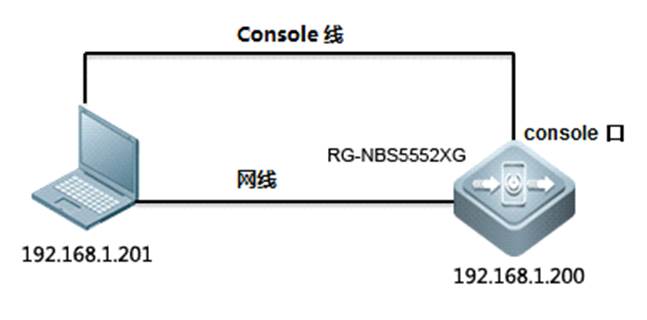
在设备设备运行情况下,对交换机软件版本进行恢复出厂设置。
二、网络拓扑
三、操作步骤
1. 使用Web进行配置
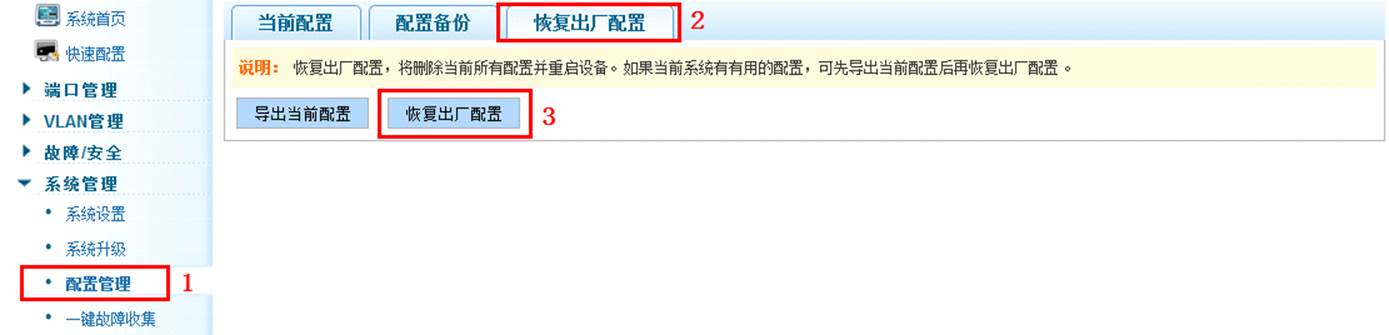
步骤1:单击“系统管理”>“配置管理”,进入配置管理页面;
步骤2:单击配置管理页面上方的“恢复出厂配置”标签,进入恢复出厂配置页面;
步骤3:单击“恢复出厂配置”按钮,在弹出的提示信息对话框中单击“确定”按钮,开始恢复出厂配置。
2. 使用CLI进行配置
以管理员身份登录特权EXEC模式后,输入reset system命令并执行,在系统提示信息后面按下“y”,即可恢复出厂配置。
Ruijie#reset system
This command will clear the system's configuration to the factory
default settings, including the IP address.
Clear system configuration, save, reboot? (y/n) [n] y
Saving configurations and logs to NV-RAM...... Done.
Please wait, the switch is rebooting...
3. 恢复出厂设置后用户和密码恢复为admin /admin,同时管理地址也恢复为192.168.1.200.